When Defensive Programming Doesn’t Work

When you’re writing software that interacts with another system, do you really know how that system behaves when it encounters errors? Do you really know what happens when you call IFooRepository.GetFoo(), which is supposed to return an object of class Foo, when the Foo doesn’t exist?

This situation happens a lot in programming. Let’s consider the most typical situations:

  • GetFoo returns a null. I can check for null and handle the case when the requested Foo doesn’t exist.
  • It throws an exception. No worries, I can catch the exception and do something to handle it.
  • It returns a DefaultFoo – following a Null Object Pattern. Excellent! I can get what I want out of this foo by invoking a method polymorphically, without worrying about nulls and exceptions.

And every now and them, life throws you a curveball.

The repository does lazy load. No need to check for null – it is never null. No need to catch exceptions – they are never thrown. You always get a non-null Foo object. When you try Foo.Bar(), that’s when the data access layer actually goes to work and you get a FooBarException. You practice defensive programming, check for nulls, and all you get is this tech support ticket.

What To Do

  • Know for sure the behavior of your system’s dependency (in the above example, the repository). If you’re writing it, use the same behavior consistently. Implement error cases test-first (expect null, expect exception, etc.)
  • If you didn’t write the dependency, write a learning test around it. Set up a test that forces it to do something that indicates an error. Expect exception – aha, that’s not what it does! Now you know. If the system’s behavior changes in its next version you will know it as soon as your automated learning test fails.
  • Write a unit-test using a stub. Simulate the dependency’s behavior in a stub object injected into your system under test. This assumes, of course, that its design follows SOLID Principles, in particular, the Dependency Inversion Principle.
  • Use code coverage. If you see that exception catch blocks and code paths after checking for nulls are not covered, that may be a sign that they are dead code and do not handle actual errors.
Posted in hands-on | Leave a comment

When Writing a User Story, Write It on a Card

This is a quick follow-up to the earlier post, When Writing a User Story, Always Start with the User Persona.

The post was about a pseudo-user story (“as an application, I want to invoke an API to get grades from a course”) and two real stories that replaced it

Identifying the user personas made a big difference, of course.

But it is also worth noting that the original story existed only in the form of electronic entry, while the two “real” stories were written originally on index cards. The two stories soon went separate ways. The “teacher” story remained alone, while the “student” story soon joined another student-centric grade story (also written on an index card!). It may still join another couple of stories sitting next to it on the backlog card wall. Such backlog reorganization was never possible with the electronic “as-an-application” “story.”

Writing these stories on index cards made a very important difference.

Posted in hands-on | Leave a comment

When Writing a User Story, Always Start with the User Persona

I’ve recently come across a “user story” in an electronic project-management tool: “As an application, I want to invoke an API to get grades from a course.”

An experienced agilist will notice right away that this “story” lacks a user persona. An application calling an API is not a persona. A novice might ask, but we don’t really have a user persona, all we’re trying to provide here is a connection point for other applications, which can be used by different types of users for a variety of purposes.

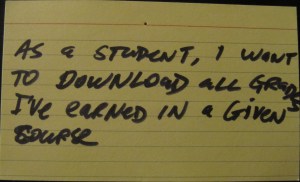
The answer is of course to identify users of such applications. In university courses, there are teachers and students. If we write this story from a student’s point of view (assuming the user persona is a student), it might look like this:

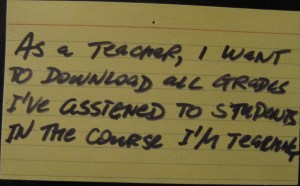
But from a teacher’s point of view, it would look very differently:

What are the differences?

  1. Data sets. In one case, we’re getting grades assigned to one student (all grades for homework, tests, mid-term, etc.) in a course; in the other case, we’re getting a matrix of such grades for all students.
  2. Security. When students try to access grades, the business rules are very simple: they allow any student to see their own grades in the course they’re taking. Therefore, the system only needs to authenticate the students and check that he or she is enrolled in the course. But downloading the grade matrix probably requires additional permission checks. Even then, there may be different access levels; for example, the professor can access the entire matrix, teaching assistants can access only certain subsets of its rows, etc.

We can now see clearly that there are two completely different user stories here. And identifying the user persona made all the difference.

Posted in hands-on | Leave a comment

Waterloo Agile and Lean April Meeting Notes

At the monthly Communitech Agile and Lean Peer-2-Peer meeting in Waterloo today, our speaker was Jason Little. The title of his talk was Making Your Organization Progress and Agile Transition Visible. Some materials from this presentation are posted on his blog and the full presentation may be available later.

I am not going to give a recap of this presentation here; instead, I want to write down a couple of things that were the most important to me.

First, I liked how the presentation showed the layout (“open, collaborative space”) that three agile coaches had an opportunity to implement at a company. Many companies tried to make a change from “cubicle farms” of the 1990s, but most ended up with just more, smaller cubicles with lower walls. Here, it was clear what “open” and “collaborative” meant: long, straight, pair-programming-friendly tables, lots of walking space and walls free of any furniture.

Second, and this was very impressive, there were walls of cards everywhere: task and backlog board for each team (there were 9 product teams in the engineering department of about 100 employees), release board, agile transition board, and several “common” boards to visualize company-wide information. Note that there would be no place to put all this visualization if walls were obstructed by cubicles and filing cabinets.

Third, the agile transition board, which was used to track individual teams’ agile adoption progress, was a kind of a kanban board. It had the initial state (“not started”), the done state (“on their own”) and two intermediate states: “training/kickoff” and “embedded coach.”

Posted in user groups | 1 Comment